
Latest iOS 13.5 update lead to faster iPhone battery draining


This newfound awareness of battery life by Apple is expected to continue this year as one rumor calls for the iPhone 12 Pro Max to come equipped with a 4400mAh battery, a 10.9% hike from the 3969mAh battery that powers the iPhone 11 Pro Max. But some of that additional battery life will be used to help the phone connect to 5G networks and possibly power a 120Hz refresh rate for the displays on the "Pro" models. There is still a possibility that the 2020 iPhone 12 Pro models will ship with a 90Hz refresh rate or the traditional 60Hz rate.

Have you noticed that since installing iOS 13.5.1 that you need to charge your iPhone's battery more often?
You might have even noticed that the iPhone is feeling warm -- or even hot -- even when it's not doing anything.Yes, it seems like this release suffers from yet another battery drain issue.iOS 13.5.1 was released June 1st, and seemed to contain little more than a fix for the Unc0ver jailbreak. This seemed odd since there was a lot of negative chatter from iOS 13.5 users about a whole raft of bugs, ranging from an irritating battery drain bug, MP4 playback being broken, and some people's devices are stuck in endless reboot loops.After working with a number of Hardware 2.0 readers, the problem seems to come down to apps running in the background.

What brings up all of this battery talk is a bug that has caused iPhone batteries to drain faster. According to several iPhone users writing on Apple's "Discussion" website (via ZDNet), faster battery draining has been an issue since the iOS 13.5 update. But the most recent update to iOS 13.5.1 has also set off another wave of iPhone users complaining about the lower battery life of their phone.
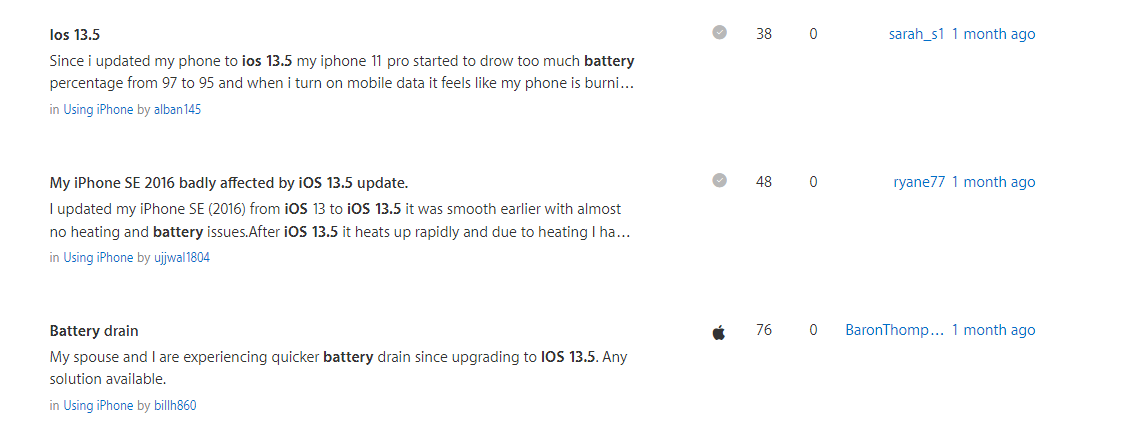

Are you affected by this issue? To check, go to Settings > Battery and then look at the Screen Off activity. If this is over an hour, it's likely to be an issue. Close to an hour and that may be having quite an adverse effect on battery life.You can also tap on Show Activity next to Activity By App. This will show you if any apps are consuming battery while in the background. A small amount of activity is normal, but many tens of minutes or hours is not good

Is there anything you can do about it?
If you want to stop certain apps from working in the background, go to Settings > General > Background App Refresh and toggle off those apps that you would prefer not work while off screen. 

The good news is that Apple is working on iOS 13.6, which is currently in beta (beta 3 was released the other day). I've spoken to several people running this beta on a range of devices and the feedback I'm getting is that it's an overall improvement on the current release.
.


Comments

Popular posts from this blog

Neuralink: Elon Musk unveils pig with chip in its brain

  Elon Musk has unveiled a pig called Gertrude with a coin-sized computer chip in her brain to demonstrate his ambitious plans to create a working brain-to-machine interface. "It's kind of like a Fitbit in your skull with tiny wires," the billionaire entrepreneur said on a webcast. His start-up Neuralink applied to launch human trials last year. The interface could allow people with neurological conditions to control phones or computers with their minds. Mr.Musk argues such chips could eventually be used to help cure conditions such as dementia, Parkinson's disease, and spinal cord injuries. But the long-term ambition is to usher in an age of what Mr.Musk calls "superhuman cognition", in part to combat artificial intelligence so powerful he says it could destroy the human race. Elon Musk reveals brain-hacking plans Gertrude was one of three pigs in pens that took part in Friday's webcast demo. She took a while to get going, but when she ate and sniffed ...

Microsoft to Phase out Support for legacy browser Internet Explorer in Upcoming year

From the upcoming year, Microsoft 365 apps and services will no longer support Internet Explorer. Microsoft is bidding farewell to Internet Explorer 11 as well as Microsoft Edge Legacy. The company will be withdrawing support for the browser in a phased manner. Starting November 30, the Microsoft Teams web app will no longer support Internet Explorer 11. By August 17, 2021, the browser will no longer be supported by the remaining Microsoft 365 apps and services. Meanwhile, it is also ending support for the Microsoft Edge Legacy desktop app on March 9, 2021. After this date, the desktop app will no longer receive new security updates. Microsoft has reportedly been planning to cut support for the Internet Explorer brand for quite some time now, a move which first became apparent in 2015 with the company rolling out the new Edge browser under the codename 'Project Spartan'.

Microsoft is taking in charge to buy the Chinese App TikTok

Microsoft has posted a statement yesterday on its corporate blog that says it will continue discussions on a potential TikTok purchase in the U.S. As a part of the statement, it says that it may invite other “American investors” to participate on a minority basis. The company says that this is a result of conversations between CEO Satya Nadella and President Trump. That is, basically, the ‘news’ here. Previous reports and our own digging pointed to the situation is totally in the hands of the White House, with Microsoft willing to make the buy but having roadblocks in the form of Presidential sentiment. If Satya has engaged Trump directly then there could be light at the end of this possibility tunnel after all. “Following a conversation between Microsoft CEO Satya Nadella and President Donald J. Trump, Microsoft is prepared to continue discussions to explore a purchase of TikTok in the United States,” the statement reads. “Microsoft fully appreciates the importance of addressing the ...